Setup & Usage Guide
-
Configure virtual environment
python -m pip install --upgrade pip python -m venv env ./env/Scripts/activate -
Installing gRPC toolkit
> python -m pip install grpcio > python -m pip install grpcio-tools -
Sample code:
- The sample code for each category of communication between client and server is available in grpc-dev branch, clone it out for reference.
-
Create
.protoprotobuf file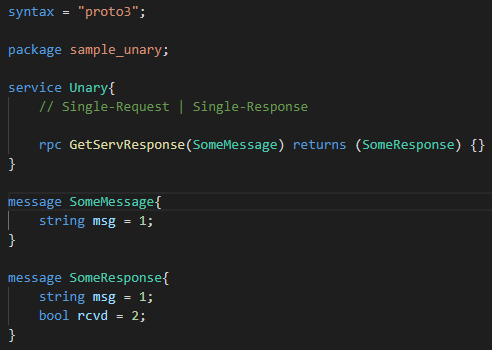
-
Generate stubs using below command
> (env) python -m grpc_tools.protoc --proto_path=. --python_out=.\src\ --grpc_python_out=.\src\ .\protos\*.proto -
Generated Code from ProtoCompiler:
-
The protoc (Compiler) results in generating
*_pb2.py & *_pb2_grpc.pyfor respective.protofile. -
The generated code gets synthezied in
*_pb2.pywhereas gRPC specific code (data class) will be available in*_pb2_grpc.py. -
Elements generated in gRPC specific code:
-
Stub (*Stub): The generated stub class will be used by gRPC clients. The stub objects are initialized with same names of corresponding methods defined as service in proto file.
-
Servicer (*Servicer): Each service defined in proto file will generate a Servicer class which will be implemented by Server and each method defined in service must be overriden by Srrver class.
-
Registration Function (add_*_to_server): Each service generates a function that needs to registered with
grpc.Serverobject so that Server can address multiple services.
-
-
-
Create Server service which uses generated stubs to take request as input and returns the response.
-
Create Client service which uses generated stubs to send the request and wait for the response.
-
Enable Server Reflection:
- Install grpcio-reflection package
(env) > python -m pip install grpcio-reflection-
Import reflection module
from grpc_reflection.v1alpha import reflectionin server code. -
Configure reflection service by adding the service names
  # Server Reflection
  server_names = (
      pb2.DESCRIPTOR.services_by_name['Unary'].full_name,
      reflection.SERVICE_NAME
  )
  reflection.enable_server_reflection(server_names, server)